
Publish an App Without Coding Knowledge

You built an app with Lovable, Bolt or Cursor, it runs in your browser, and everything feels finished. Then you want to put it online, and suddenly everyone is talking about domains, servers, SSL certificates and "env vars". It sounds like you still need a computer science degree just to take the final step. If the whole vocabulary trips you up, our glossary of app hosting terms explained sorts out what each one means.
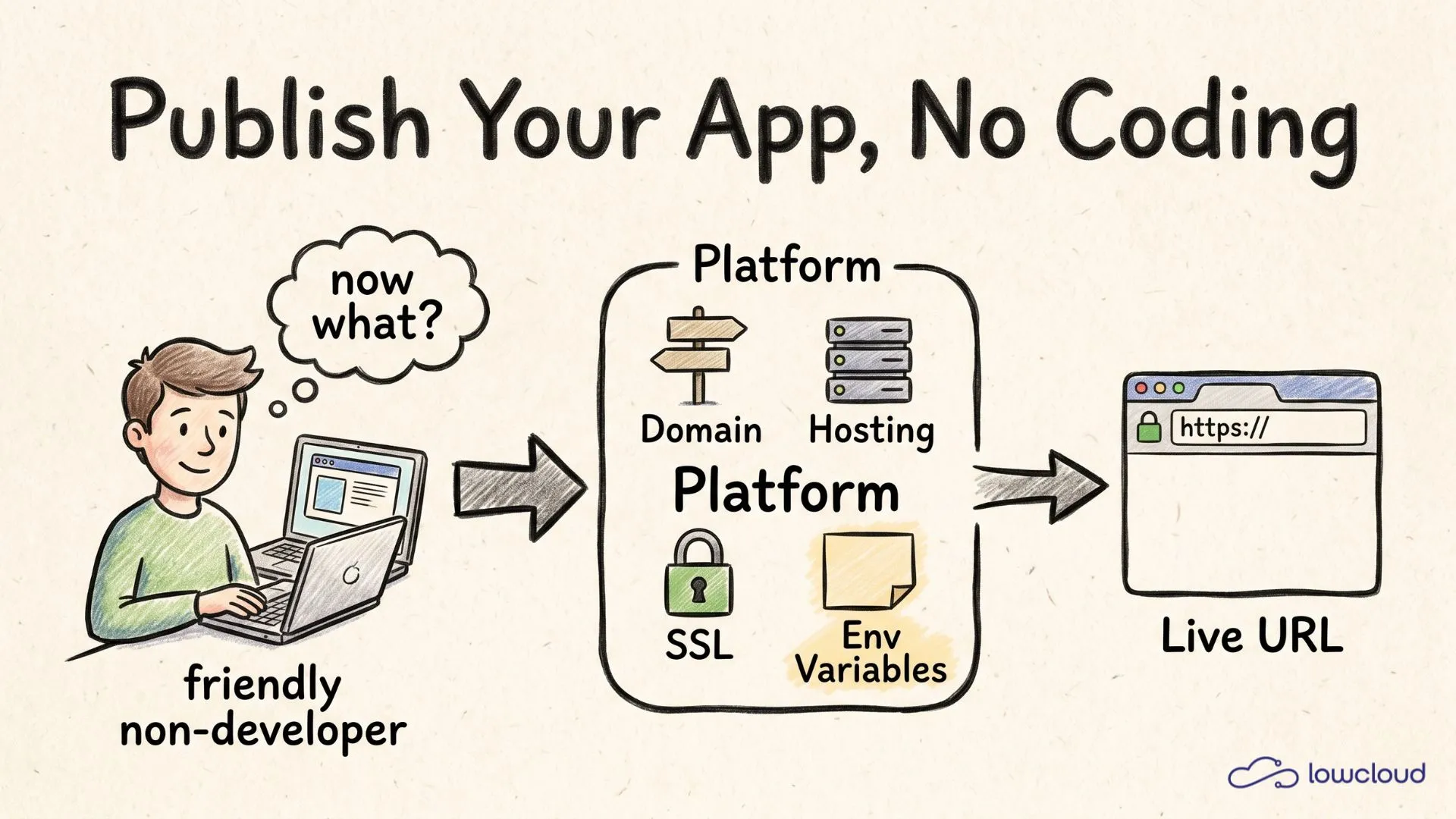
You do not. Publishing an app requires no coding knowledge, only an understanding of four terms: domain, hosting, SSL and environment variables. A modern platform handles three of them completely. The one that is left we explain here in plain language, so you know exactly what you really have to do yourself.
Key takeaways
- Getting an app live requires no coding knowledge, just four building blocks: domain, hosting, SSL and environment variables.
- The domain is your app's address, hosting is the server, SSL is the lock for "https", environment variables are the secret credentials.
- SSL is free and automatic on modern platforms, thanks to Let's Encrypt, which issued more than ten million certificates per day in 2025 (Let's Encrypt, 2025).
- Platforms like lowcloud, Vercel or Render handle the server, SSL and build. The only thing you enter yourself is your environment variables.
What do you actually need to get an app live?
To publish an app you need exactly four things: an address (domain), a place where the app runs around the clock (hosting), encryption for secure connections (SSL) and a spot for your secret credentials (environment variables). You do not need to run your own server for any of this.
The reason this used to feel like server stress: you had to wire up each of those building blocks by hand. Today a deployment platform delivers them as a package. You upload your project or connect your Git repo, and the rest happens in the background.
Keep the four terms as a checklist. We walk through them one by one in the rest of this article, from the easiest to the one you actually touch yourself. If you then want to go deeper into the path from preview to a finished address, our guide on the live URL for your app shows the full flow.
What is a domain, and do you need one?
A domain is your app's address, the thing people type into the browser, for example your-app.com. Technically the Domain Name System translates that name into an IP address, a string of numbers that computers understand. You do not need to know anything about DNS, except that it connects the address to your server in the background.
You do not strictly need your own domain at the start. Almost every platform gives you a free subdomain, such as your-app.lovable.app or your-app.bolt.host, that makes your app reachable right away (No Code MBA, 2026). For a real project you will want your own domain later, which usually costs between one and fifteen euros per year depending on the ending.
Connecting your own domain is not rocket science. On most platforms it is three steps: register the domain with a provider, set a DNS record, done. According to Lovable, none of these steps require networking expertise, most of it is copy and paste (Lovable, 2026).
What is hosting, and why do you not need your own server?
Hosting is the place where your app runs so it stays reachable around the clock, even when your laptop is off. As long as your app only runs locally on your machine, no one else can see it. Hosting means putting it on a server that is always online.
The important point for you: you do not have to set up, secure or maintain that server yourself. That is exactly the difference between "I rent a bare server" and "I use a platform". A platform gives you hosting ready to go, including updates and scaling. For beginners, services like Vercel, Netlify, Render or lowcloud offer precisely that (Website Planet, 2026).
On cost, simple hosting plans often sit between zero and around twenty euros a month, depending on how much your app does. You pay for compute, not for server admin hours. That is what makes the step from a built app to a live app feasible for non-developers in the first place.
SSL sounds complicated, but today it is automatic
SSL is the lock symbol in the address bar and the reason an address starts with "https". It encrypts the connection between your visitor's browser and your app so no one can read along. Without SSL, browsers warn your visitors with "Not secure"; with SSL they see the trusted lock.
The good news: this is not your job. Modern platforms issue SSL automatically and renew it themselves, in the background through the free service Let's Encrypt. With Lovable, for instance, the certificate is generated and installed automatically once the domain is connected, with no manual configuration at all (Lovable, 2026).
One number shows how common this is: Let's Encrypt issued more than ten million certificates in a single day for the first time in September 2025 and holds over 63 percent market share (Let's Encrypt, 2025). Certificates expire every 90 days and renew automatically. You will never notice any of it.
What are environment variables, in plain language?
Environment variables are the hidden note with the secret credentials that your app reads but no one should see. These include things like your API key for an AI service, a password for your database or an access token for a payment provider. They separate your app's secrets from its code.
Why not just write them into the code? Because anyone who sees the code would then also see your passwords. A comparison from practice: you would not tape your safe combination to the front door. In the same way, credentials do not belong in code that can end up on GitHub, for example. There are real cases where people woke up to thousands of euros in cloud costs because they accidentally published their keys (Vibe Coder Blog, 2026).
This is the one building block you actually touch yourself. In practice it is simple: your platform's dashboard has a field where you enter a name and a value, for example OPENAI_API_KEY and the matching key. The platform stores it encrypted and gives it only to your app. If you want to look deeper into pitfalls like this, our post on common deployment problems in vibe coding collects the most frequent traps.
Which tools handle all of this for you?
The short version: almost everything. A modern deployment platform delivers hosting, SSL and the build ready to go, plus a free subdomain to start. What is left for you, realistically, is entering your environment variables and optionally connecting your own domain.
From the deploys that vibe coders and AI app builders run on lowcloud, we see exactly this pattern. The only point where people without a coding background pause briefly is the environment variables. Servers, SSL and build run through automatically, without anyone touching a configuration file. Once it is clear that only this one note comes by hand, the hurdle disappears.
The following table shows who is really needed for each building block:
| Building block | Do you do it yourself? | Handled by the platform | Cost |
|---|---|---|---|
| Hosting / server | No | Fully | included in the plan |
| SSL (https) | No | Automatic, Let's Encrypt | free |
| Build and deploy | No | Via Git push or upload | included in the plan |
| Environment variables | Yes, enter them | Stores them encrypted | included |
| Domain | Optional | Free subdomain, own one connectable | 1 to 15 euros per year |
Out of five rows, exactly one is a real task for you: entering the environment variables. Everything else is either optional or handled by the platform. As a side note, you can also pay attention to the location with your provider; with lowcloud, for example, your data sits on servers in Germany.
Frequently asked questions
Can I really get an app live myself without coding knowledge?
Yes. If you built your app with a tool like Lovable or Bolt, publishing is often a single click on "Publish" that gives you a live URL right away (No Code MBA, 2026). For more control you use a deployment platform that handles the server, SSL and build. You do not need to code for any of it.
How much does it cost to put an app online?
Often nothing to start. Many platforms have free tiers with a subdomain and free SSL. As the app grows, simple plans usually sit between zero and around twenty euros a month. Your own domain adds roughly one to fifteen euros per year. SSL is generally free through Let's Encrypt.
Do I strictly need my own domain?
No, not at the start. Every platform gives you a free subdomain like your-app.lovable.app that makes your app reachable and shareable right away. Your own domain like your-app.com becomes worthwhile once the project gets serious and needs to look professional. Connecting it takes only a few steps.
Do I have to deal with SSL and security certificates?
Usually not. Modern platforms issue the SSL certificate automatically, install it, and renew it every 90 days on their own (Let's Encrypt, 2025). You can tell it works by the lock symbol and by your address starting with "https". You do not need to configure anything manually.
What happens if I forget an environment variable?
Then your app either does not start, or a feature stays silent, for example the login or an AI feature. This is not a disaster, just a common beginner mistake. You add the missing value in the dashboard and redeploy, then it works. The only thing that matters is that the values never live in the code.
Conclusion
Publishing an app is not a developer privilege. Behind the server stress there are only four terms: domain as the address, hosting as the place, SSL as the encryption and environment variables as the secret note. A modern platform handles three of them automatically, for free, without you touching a configuration file. The only thing you enter yourself is your credentials as environment variables, and optionally connect your own domain. That is exactly what a deployment platform is built for. You provide the project, it gives you a secure live URL.
Get your app live in minutes: start with lowcloud now.
Preview Is Not Live: Deploy Your AI App Properly
A preview link is not real hosting. What you add when you go live: a custom domain, database, login, APIs and security. How to take your AI app properly live.
Shadow IT from Vibe Coding: The New Governance Risk
Vibe coding creates a new kind of shadow IT: self-built apps with no maintenance, no security, no GDPR. Why bans fail and how a platform fixes it.